Ultrasonic Distance Tracker
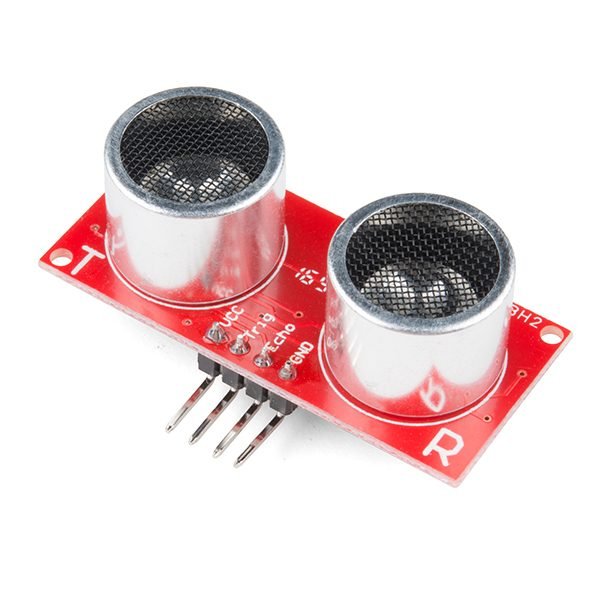
Image: SparkFun HC-SR04 Ultrasonic-Sensor 13959-01a.jpg by SparkFun via Wikimedia Commons, CC BY 2.0
Judging distance to a wall or obstacle by eye is unreliable in tight spaces — garages, parking spots, or robot navigation all benefit from a precise, real-time distance reading.
This project uses an ultrasonic sensor to measure the time a sound pulse takes to bounce off a nearby object and return, converting that into an accurate distance reading shown live on an LCD, general-purpose enough for parking assistance, obstacle detection, or as a standalone measuring tool.
How It Works
- The ultrasonic sensor (HC-SR04) emits a short ultrasonic pulse and starts a timer.
- The pulse reflects off the nearest object and returns to the sensor's receiver, stopping the timer.
- The Arduino calculates distance from the round-trip time and the speed of sound, then displays the result on an LCD.
- Configurable near/far thresholds can trigger a buzzer warning as an object gets too close, useful for parking-assist style use.
Components
Arduino Uno
Ultrasonic sensor (HC-SR04)
16x2 LCD display
Buzzer (proximity warning)
Enclosure/mount
Applications
- Home or garage parking assistance
- General obstacle detection for robotics projects
- Standalone distance-measuring tool
Advantages
- Accurate, real-time distance readings on inexpensive hardware
- Simple to adapt into other projects needing proximity sensing
- Configurable warning threshold suits different use cases
Sample Code — Distance Measurement and LCD Display
// Simplified ultrasonic distance tracker - Arduino #includeLiquidCrystal lcd(12, 11, 5, 4, 3, 2); #define TRIG 9 #define ECHO 10 long readDistanceCM() { digitalWrite(TRIG, LOW); delayMicroseconds(2); digitalWrite(TRIG, HIGH); delayMicroseconds(10); digitalWrite(TRIG, LOW); long duration = pulseIn(ECHO, HIGH); return duration * 0.034 / 2; } void setup() { pinMode(TRIG, OUTPUT); pinMode(ECHO, INPUT); lcd.begin(16, 2); } void loop() { long dist = readDistanceCM(); lcd.setCursor(0, 0); lcd.print("Distance: "); lcd.print(dist); lcd.print(" cm "); delay(300); }
Related Research
Hours
Monday - Saturday: 9:00 AM - 5:00 PM
Sunday: Not Working
Location
2nd Floor, Comptron Arcade, Kallattumukku,
Thiruvananthapuram, Kerala 695012
Book Now
+91 9633118080